For attorneys and paralegals who handle EB-1A, O-1 and NIW cases: the problem it's built for, what each screen does, and what a person at the firm still decides.
Use the arrow keys or click to move. Press C for contents.Scroll to read it as one page.
Screens come from Northlake Immigration, a demo firm with made-up people and sample data. Written Nov 27, 2026. Petitionly is a Waterfall Growth product.
Contents
Eight short parts
01of 8
The world it lives in
Three visas for people who stand out, the rules they're judged by, and who works each case.
Three visas
Three visas, one job: prove the person stands out.
O-1A
Work visa · up to 3 years at first
A U.S. employer or agent files form I-129 for the person.
EB-1A
Green card · top of the field
The person can file for themselves, with no employer. Form I-140.
EB-2 NIW
Green card · work that matters to the U.S.
Self-filed, form I-140. The National Interest Waiver skips the usual job offer.
Firms call these "merit" cases: the client has to prove what they've achieved, with a stack of documents. Building that stack is most of the work. O-1A covers science, business, education or athletics; NIW needs an advanced degree or exceptional ability.
The criterion is the claim. The evidence is the proof.
Proves an ask
Invitation email
"We'd like you to review up to four papers."
Proves the judging happened
Chair's confirmation
"Thank you for completing four reviews."
A criterion is one kind of achievement the law accepts, like "judged other people's work". Evidence is the document that proves it. The officer believes only what the paper shows: "Submitting only an invitation is not enough. USCIS needs proof that you did the judging."
Since Aug 5, 2026, a thin file can be denied with no warning.
Before
Missing evidence → RFE
A Request for Evidence said "send more" and set a deadline. It worked as a second chance.
Now · PA-2026-05
Missing initial evidence → denial possible
Officers may deny without an RFE first. A partial RFE answer is decided on what's there. RFE deadlines can be shorter than 12 weeks.
What it means for firms: the file has to be right when it goes in. That's why checking evidence the moment it's uploaded matters now. A NOID (Notice of Intent to Deny) is the last warning before a denial.
An RFE or decision comes back, and the chase starts again.
Partner or ownerRuns the firm and buys the tools. In a small firm, one person can wear two or three of these hats.
02of 8
The problem
How a merit case runs today, where the time goes, and what the latest USCIS numbers show.
A case today
Weak evidence is usually found late.
IntakeSigned, paid
ChasingEmail, Drive
Weak proofFound late
DraftingBrief, letters
ExhibitsIndex, page stamps
FilingThen wait
"This isn't enough": back to chasing, sometimes on a short RFE deadline.
Files arrive by email, Drive or the case system. A person reads each one.
A weak document often surfaces at drafting, or at USCIS.
Late evidence means renumbering the exhibit packet by hand.
Orange marks where public sources point to the most pain.
Where it hurts
Five places time and risk go.
Evidence that doesn't prove the criterion
Now without the RFE safety net. AILA: "The shift rewards documentation over description."Everyone, partner most
No capacity without a new hire
A solo merit attorney is "turning down more work than taking on" (r/LawFirm, Sep 2026)Owner
Chasing clients
For documents and for status updatesParalegal
Exhibit assembly
Building and renumbering the packetParalegal
Clients feel ignored
"you would have to pay close attention to your case even with a lawyer" (r/eb1a, Nov 2026)Client, then referrals
Sources: PA-2026-05; AILA, Jul 2026; public posts on r/LawFirm (Sep 2026) and r/eb1a (Nov 2026). The order is our reading of public sources, not a survey.
USCIS numbers
EB-1A got much harder in 2026.
32.2%
of EB-1A decisions were approvals, Apr to Jun 2026 (1,348 approved, 2,832 denied)
72.2% in FY2024
55.3%
of NIW decisions were approvals, Apr to Jun 2026 (3,835 approved, 3,103 denied)
71.0% in FY2024
24.2%
of O petition decisions had an RFE, Oct 2025 to Jun 2026
A client evidence system built for each firm, under the firm's name, live in about two weeks.
The idea
Catch the weak document the moment it's uploaded.
Client uploadsA file for one criterion
It's checkedDoes it prove that criterion?
Gap namedIt asks for the missing document
Attorney's deskThe file arrives stronger
Done for you
No sign-up page, plans or seats. We set it up around the firm's playbook, move its cases in, connect its mailboxes and train the team, then keep it running for a monthly fee.
One base, built per firm
Every firm's build starts from the same product. The Northlake demo firm is that base, filled with made-up clients.
Petitionly is a Waterfall Growth product.
123
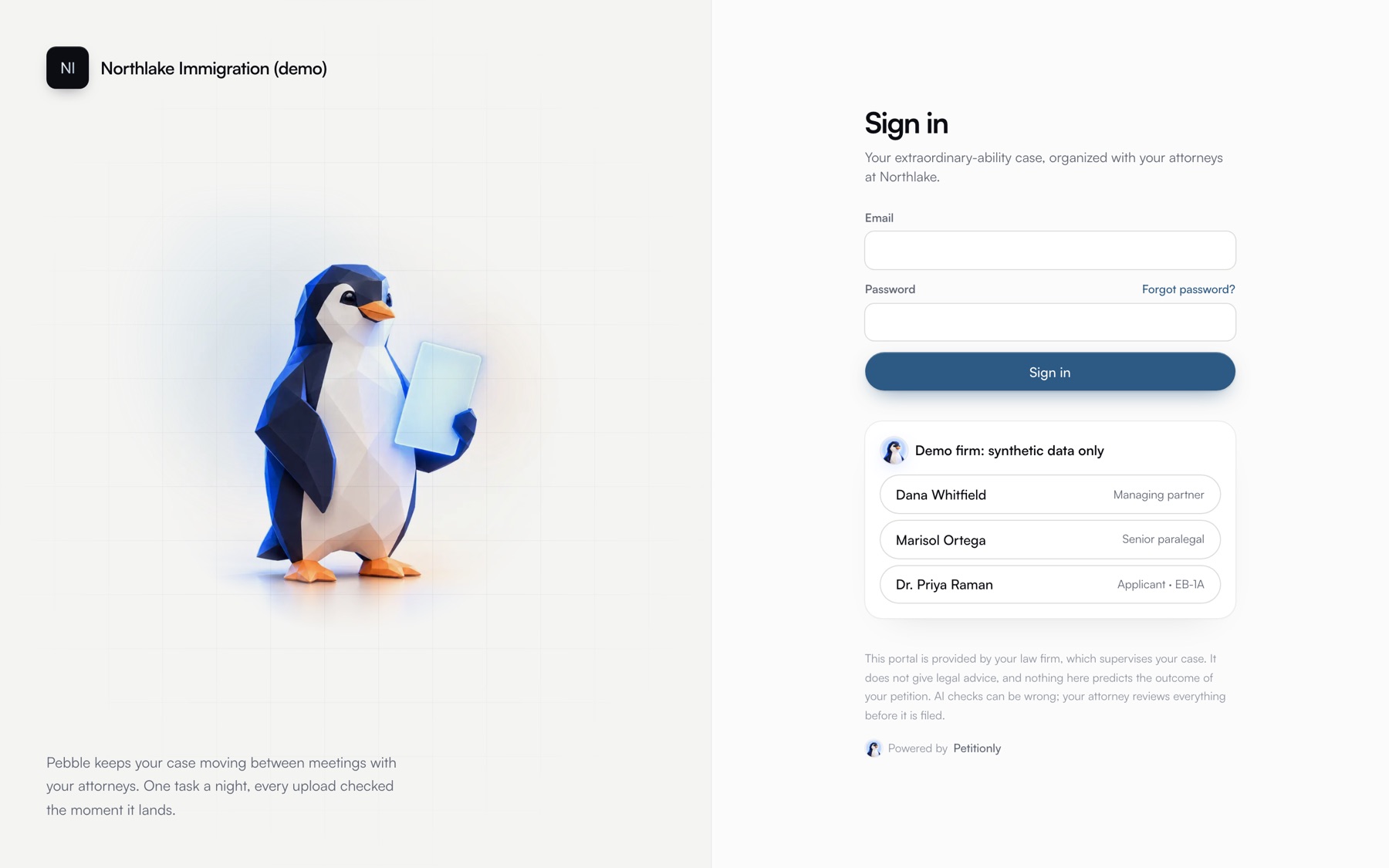
Sign-in page · demo firm, sample data
White-label
Clients see the firm's brand, not ours.
The firm's name, in the client's first screen
The firm's own disclaimer
"Powered by Petitionly", small, at the bottom
The firm's logo and colours run through every screen. It lives at the firm's address, like portal.theirfirm.com, through one DNS record we add for them. The client relationship stays the firm's.
What's included
The firm gives a few hours. We do the rest.
The firm gets
A client portal under its name and address
Evidence rules for its visa types, from its playbook
Two-step sign-in, an audit log, its data kept apart
Training, a client guide, hosting, monthly support
The firm gives
Logo and colours
Access to add one DNS record
Templates and its playbook: how it argues each criterion
A case export
A few hours of one paralegal's time
An attorney to approve the evidence rules in writing
The build
Live in about two weeks.
Week 1 · set up around the playbook
Day 1Kickoff, firm created
Day 2Brand and web address
Day 3Evidence rules and house style
Day 4Cases moved in
Day 5Mailboxes and AI budget
Week 2 · test, train, go live
Day 6Test with sample files
Day 7Staff in, training 1
Day 8Training 2, client guide
Day 9Go-live checks
Day 10Live
Business days. Day 6 uses redacted or synthetic files, never real client files. Most of the work is ours: the firm's part is the kickoff call, its materials and two short trainings.
"About two weeks from kickoff" is the plan, not a guaranteed date.
04of 8
The tour
Each screen, what it does, and what a person still decides.
The map
One case, three doors, one assistant.
Client portal
Next step, uploads, verdicts, plan, Pebble chat
Paralegal board
Every case, chasers, case pages, exports
Attorney and partner
Redlines, release, rules, brand, security
Pebble, the AI assistant, works across all threeChecks, drafts, chases, imports. It proposes; a person decides.
All screens: the Northlake demo firm on petitionly.co, captured Nov 27, 2026 at 1440×900. Demo firm, sample data. Every person in it is made up.
123
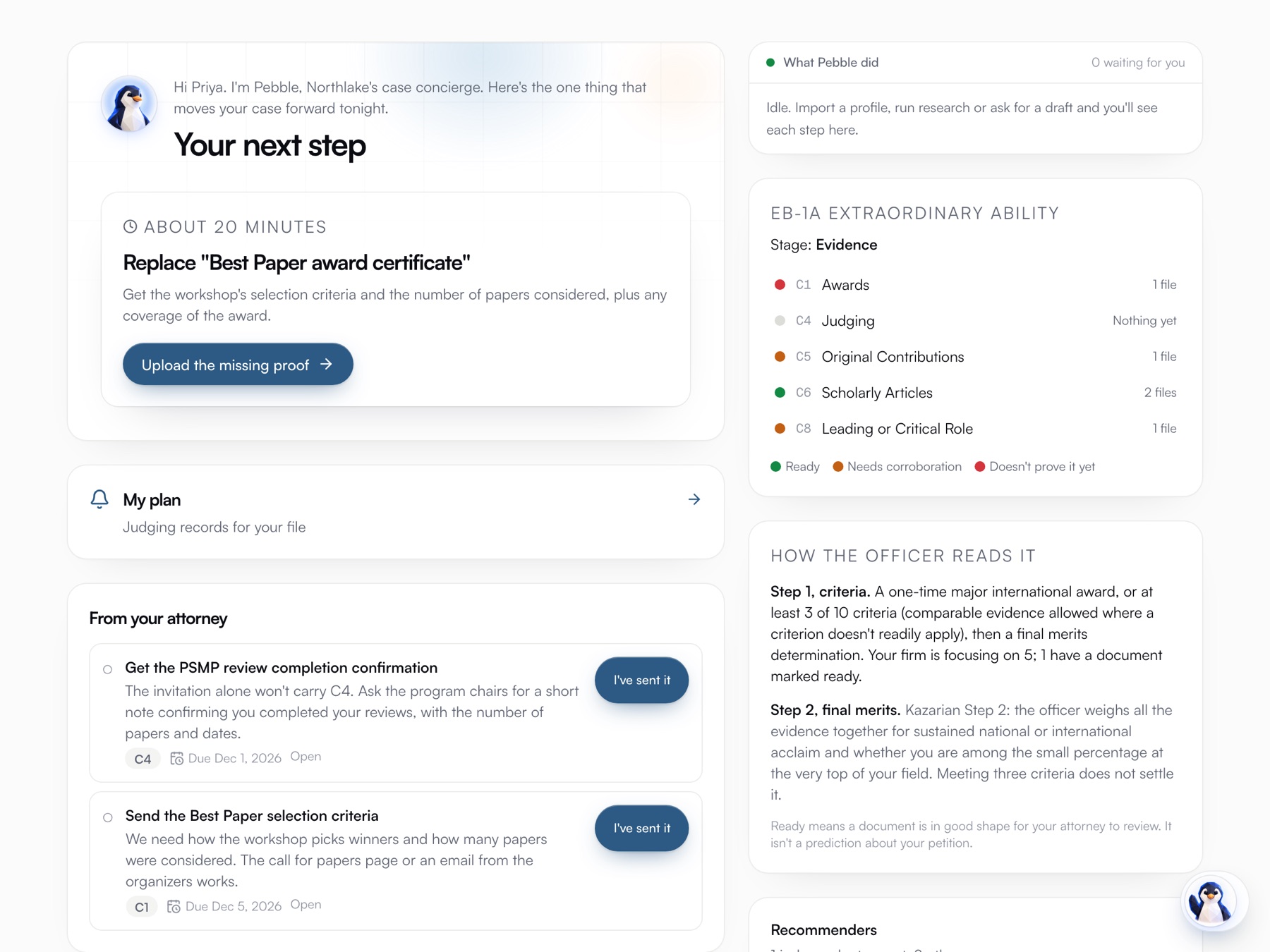
Client home · demo firm, sample data
Client · Home
The client sees one next step.
The one task that moves the case tonight
"My plan": the same tasks on a dated timeline
Tasks and due dates set by the attorney
Beside this, each criterion shows a coloured dot. There are no scores or odds anywhere, on purpose.
123
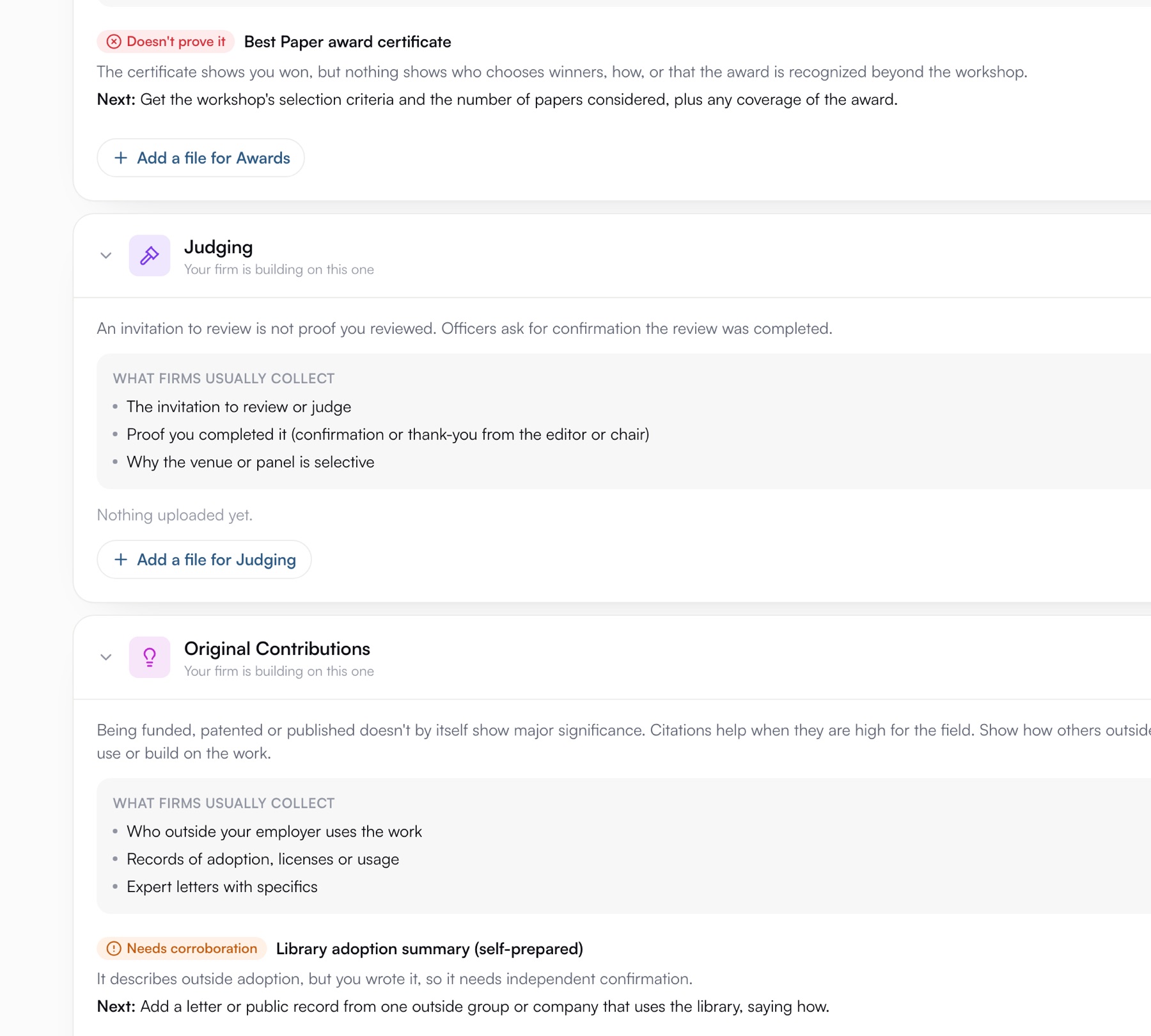
Evidence, by criterion · demo firm, sample data
Client · Evidence
Each criterion shows the trap and what to collect.
The common mistake, in plain words
What the firm usually collects
Upload straight to that criterion
The firm's know-how is written down once and reused on every case. The firm edits each checklist; its attorney owns the legal wording.
123
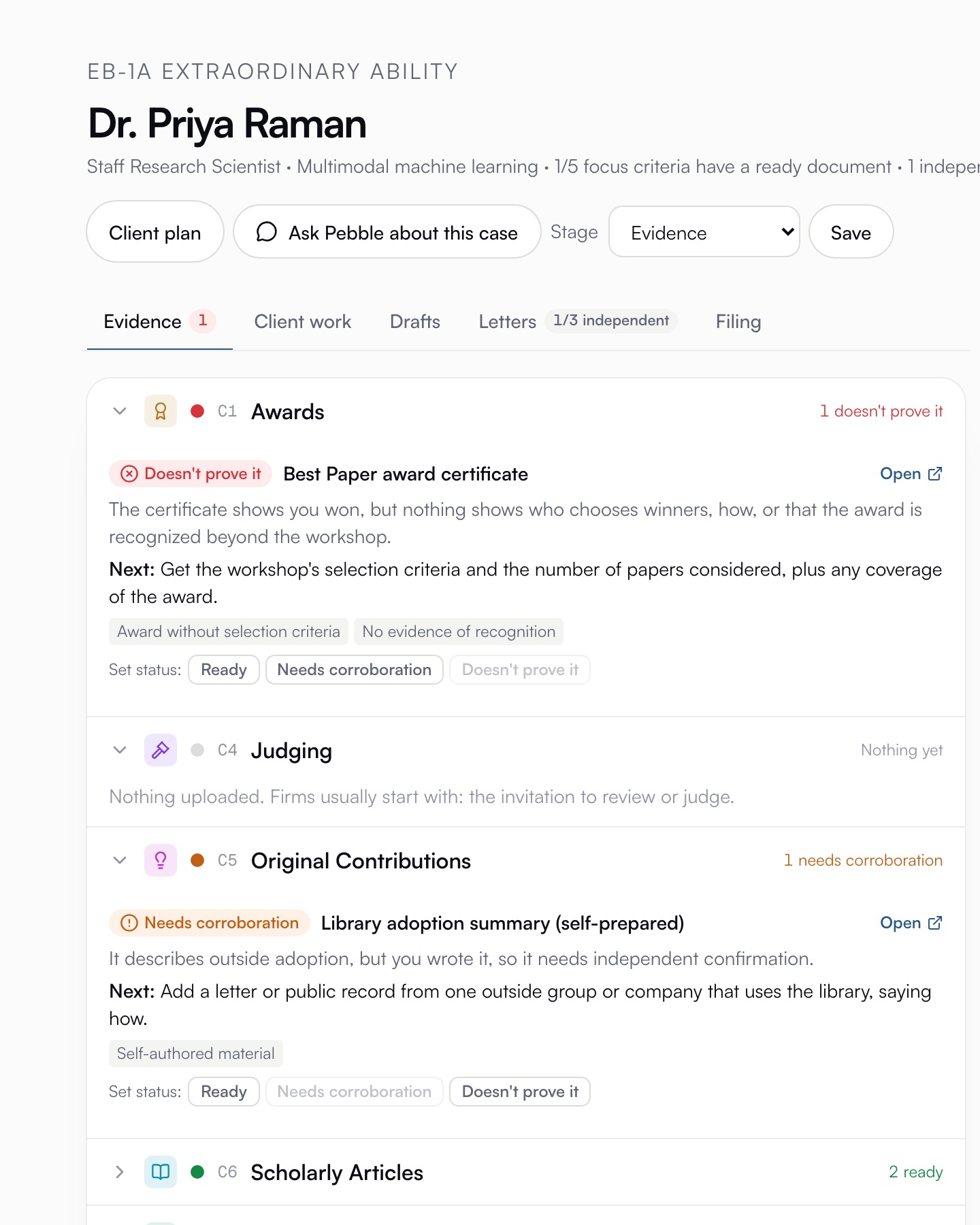
A verdict, staff view · demo firm, sample data
Upload and verdict
Every upload comes back Green, Amber or Red.
The verdict and the reason
The exact next document to get
Staff can override any verdict
The AI reads the file against the criterion's rule and trap, common RFE triggers and the firm's own rules. Green: ready for attorney review. Amber: needs corroboration. Red: doesn't prove it yet. The client sees the verdict at once.
123
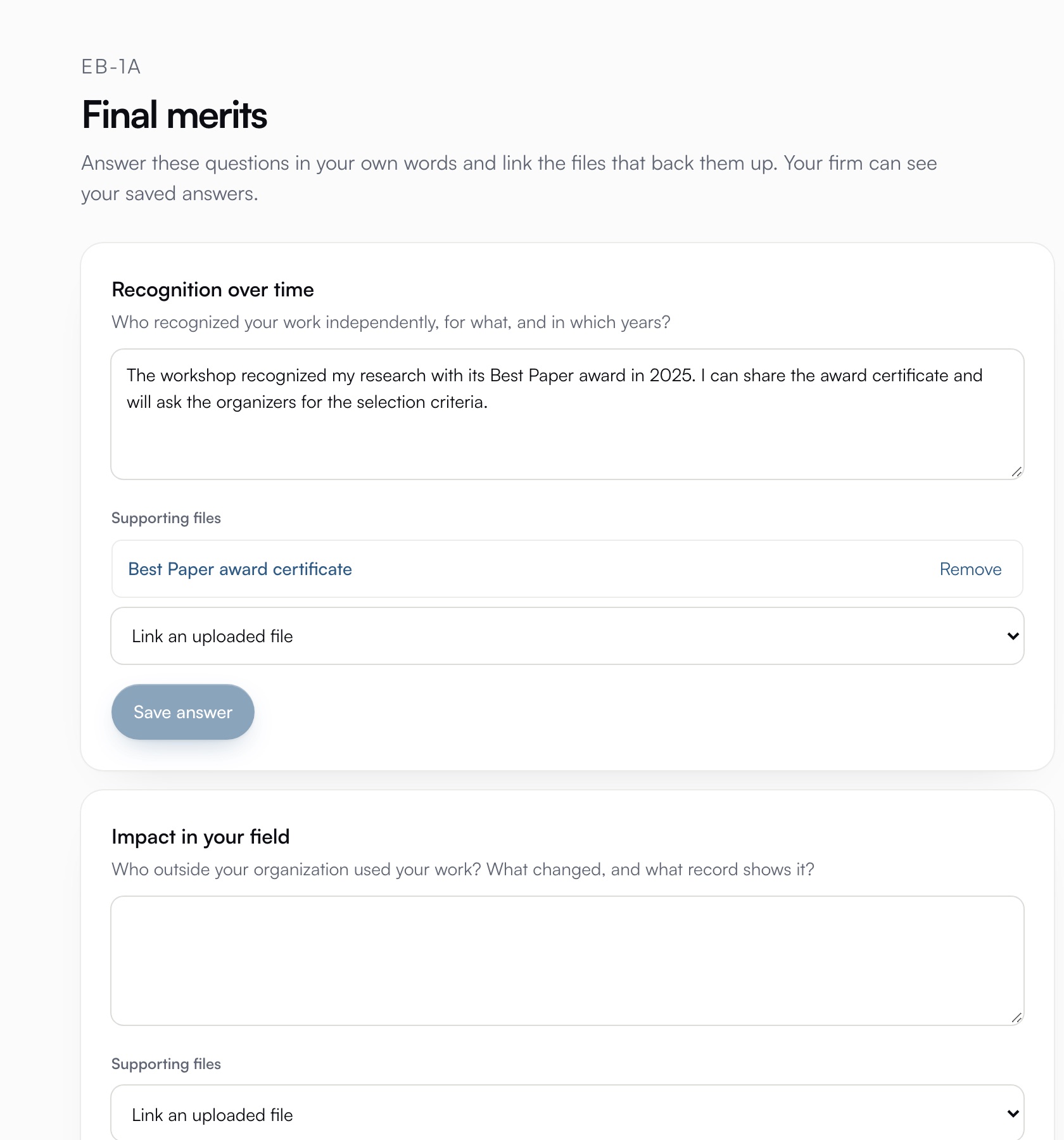
Case narrative · demo firm, sample data
Client · Case narrative
The client tells the story, tied to files.
A guided final-merits question
The answer, in the client's words
The uploaded file that backs it
NIW clients get the three prongs; O-1 clients get recognition and impact. The attorney decides what goes in the brief. A Recommenders tab warns when too few letter writers are independent; it's a list only, with no signing flow.
12
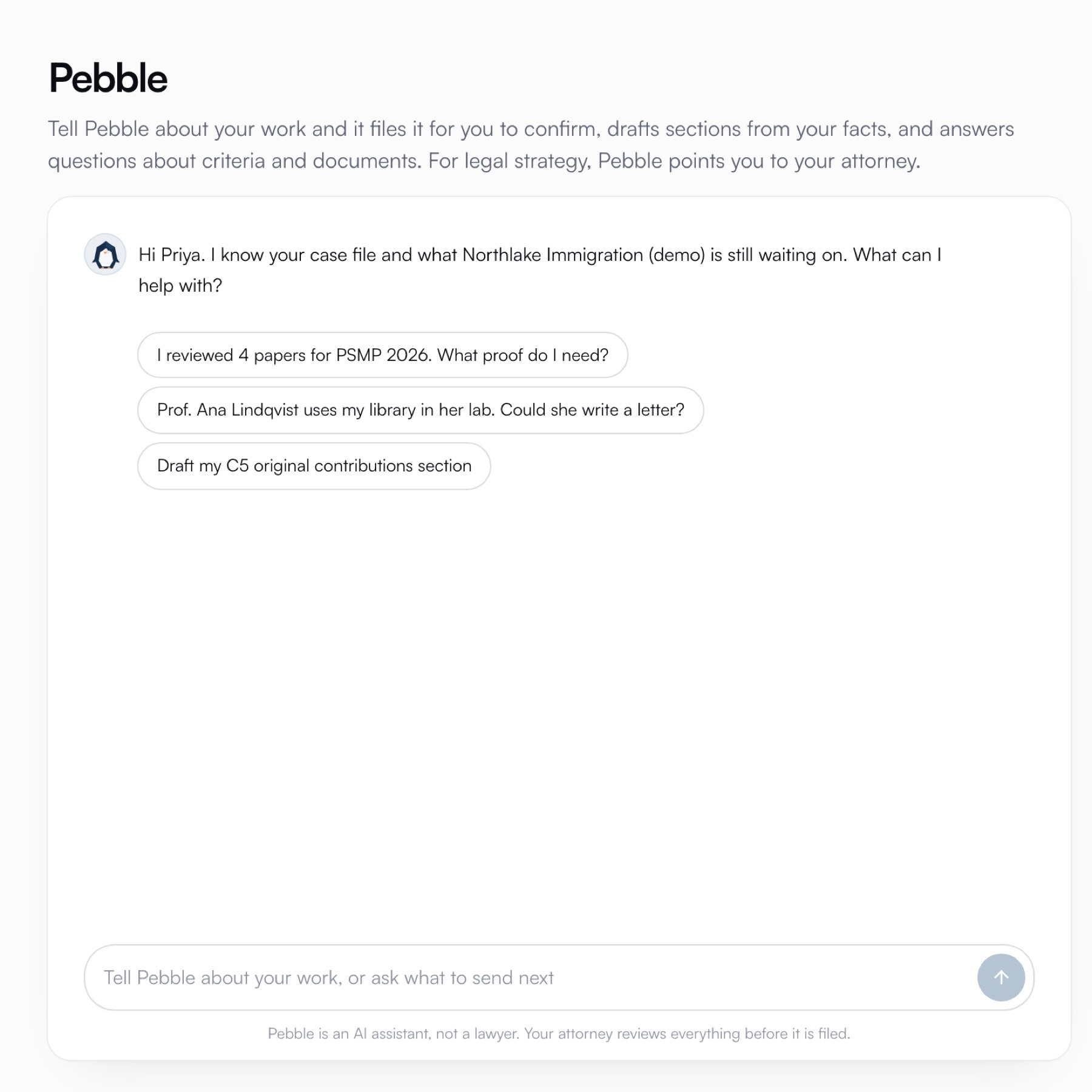
Talk to Pebble · demo firm, sample data
Client · Pebble chat
Answers at 11pm, without the attorney.
Pebble knows the case and what the firm is waiting on
Suggested questions; the client can also log an achievement to confirm
It says it's an AI, never says "you qualify", and points strategy questions to the attorney. The Drafts tab stays empty until staff release a draft: clients never see raw AI drafts.
123
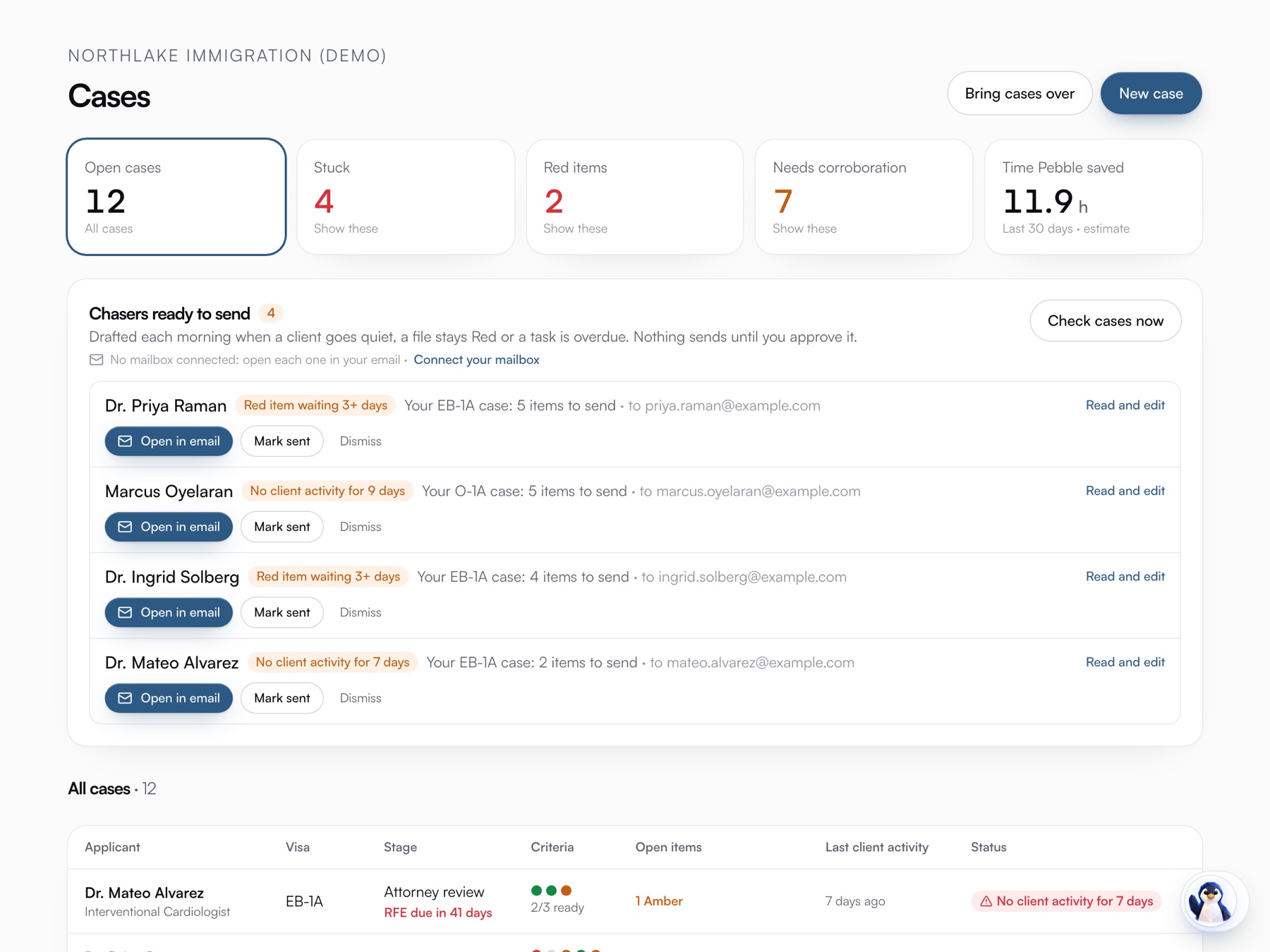
The paralegal board · demo firm, sample data
Paralegal · Board
The whole morning on one screen.
Who's stuck, Red or waiting on proof
Chasers drafted and waiting
Why each one was drafted
"Time Pebble saved" is an estimate from logged actions, not a measurement.
123
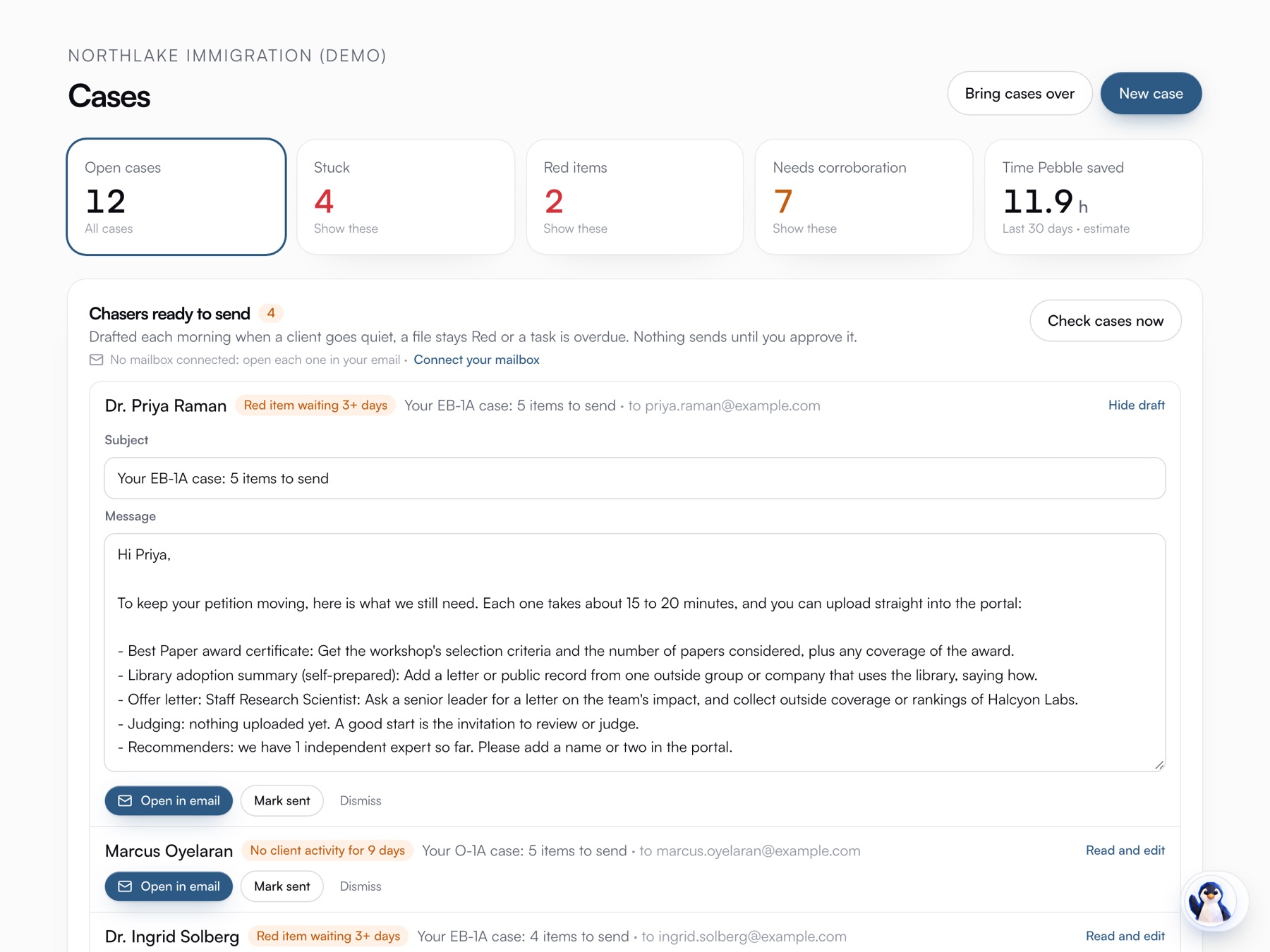
A chaser, open to read and edit · demo firm, sample data
Paralegal · Chasers
Follow-ups she approves once.
Why it was drafted: quiet client, Red file, overdue task
Exactly what's still missing
Nothing sends until she approves it
Drafted every morning. On a real build it sends from her own Gmail or Outlook; the demo has no mailbox, so it says "Open in email".
123
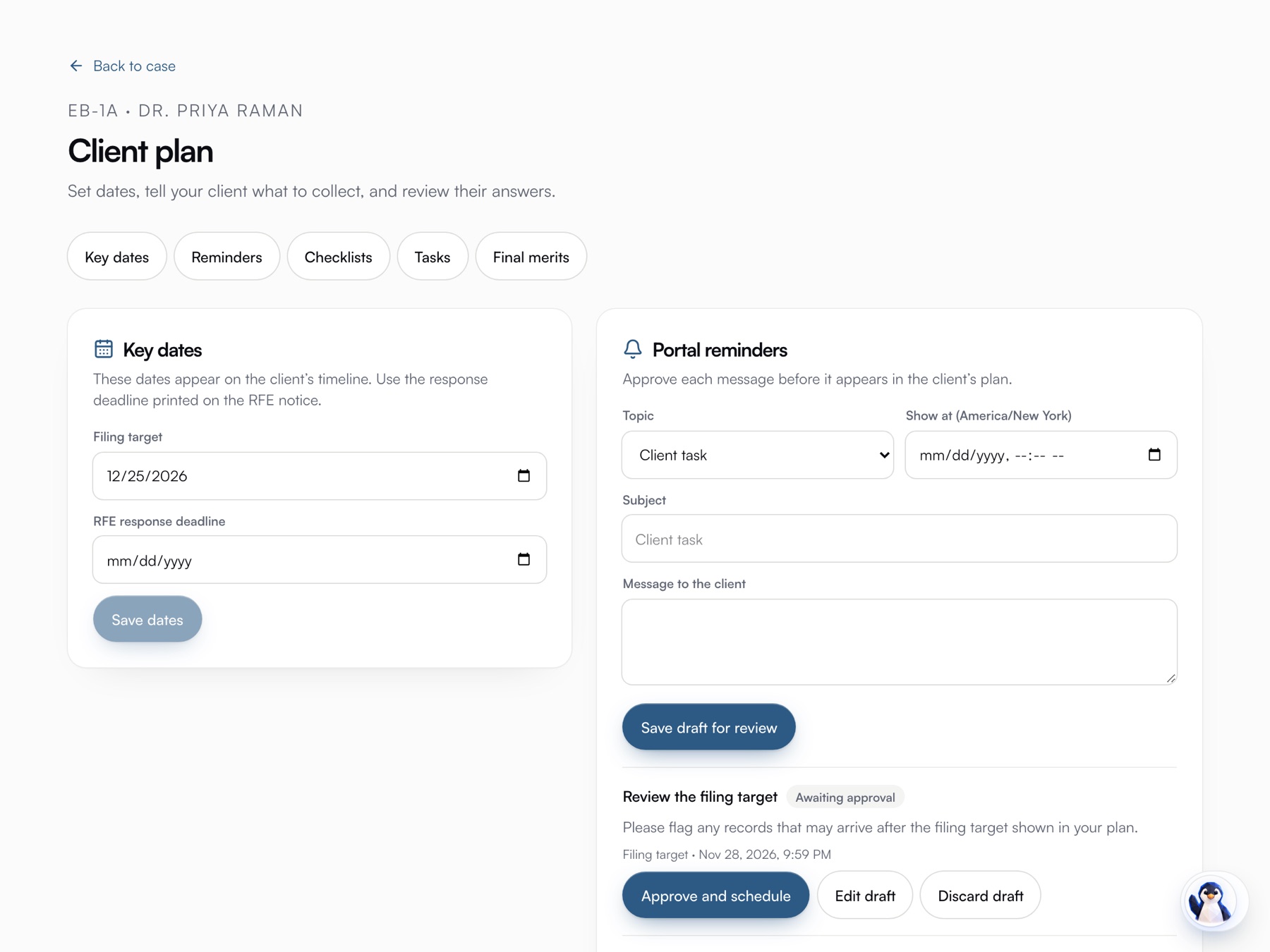
Client plan, staff side · demo firm, sample data
Paralegal · Client plan
Staff control every word the client sees.
Reminders that appear in the client's plan
Staff write or review each one
Approved and scheduled, never automatic
The same screen sets key dates, checklists and tasks. The case page holds evidence, drafts, letters and filing: one place per client.
123
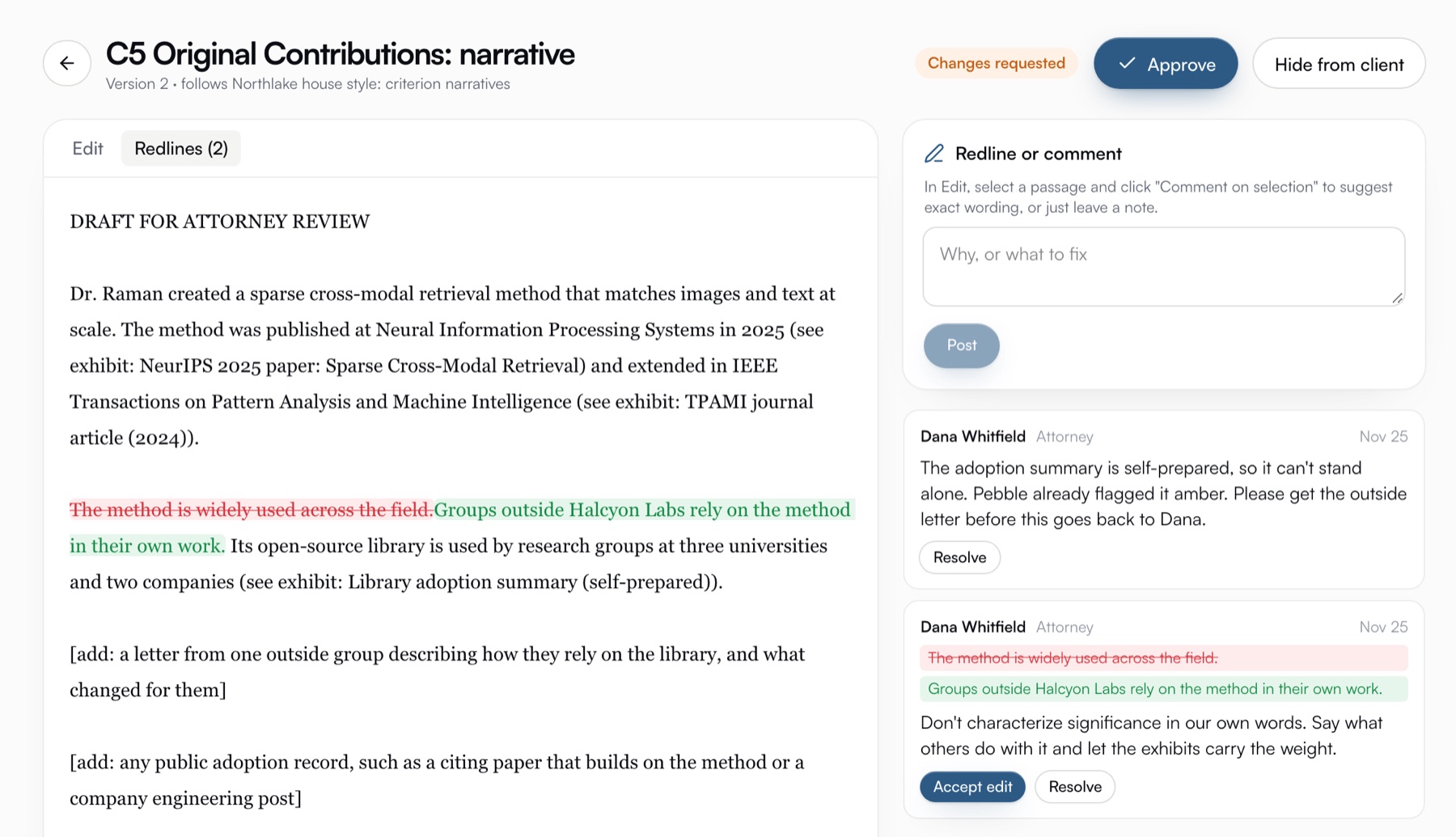
A draft with redlines · demo firm, sample data
Attorney · Drafts
Drafts that admit what they don't know.
The attorney's redline: struck words, suggested wording
"[add: …]" where a fact is missing, never an invented one
Marked as a draft for attorney review
Pebble drafts a criterion section from facts on file, in the firm's house style. The attorney approves; staff then release it to the client or hide it.
123
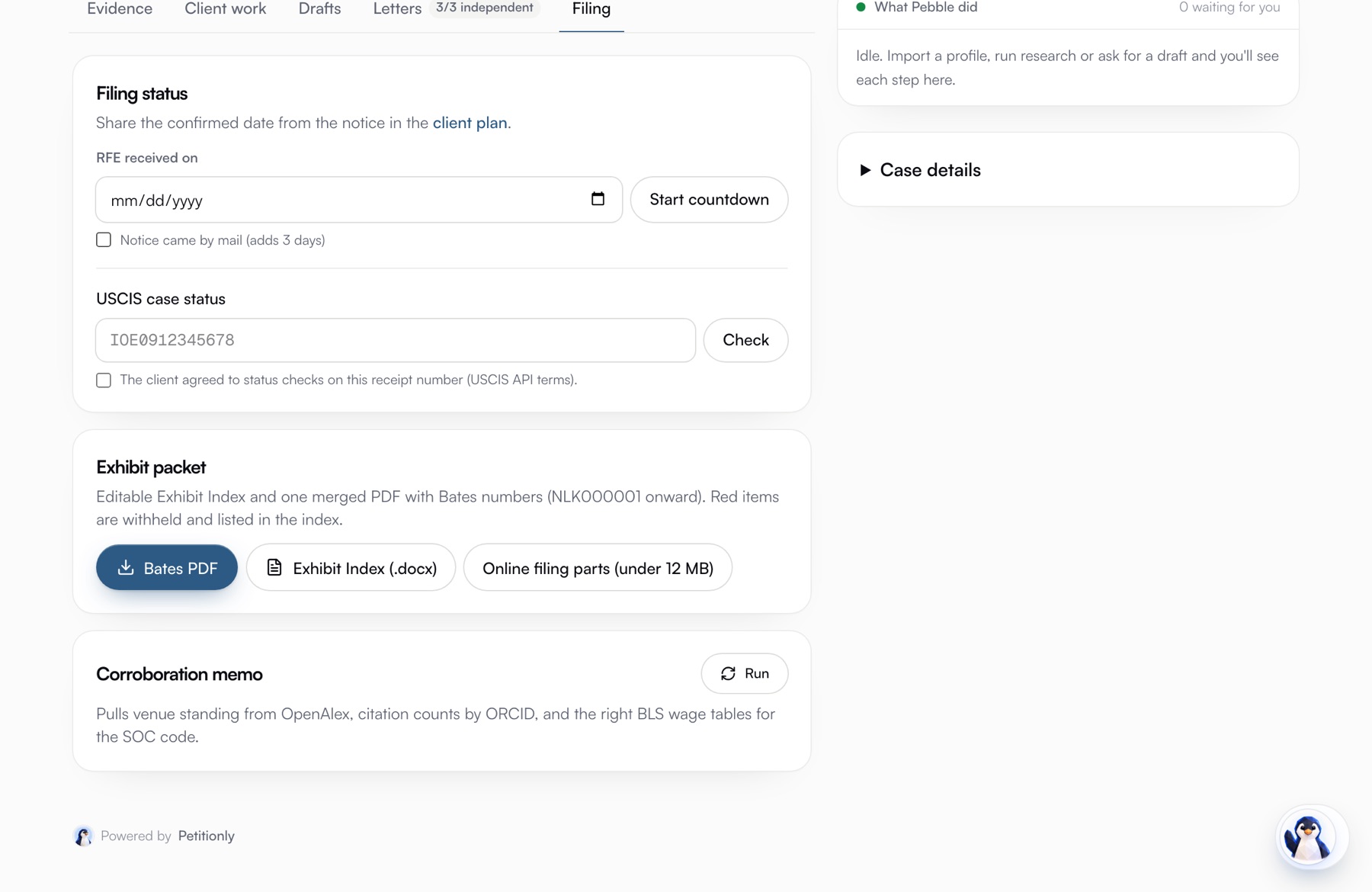
Filing tab · demo firm, sample data
Paralegal · Exhibit packet
The filing packet in one click.
One merged PDF, every page stamped NLK000001 onward
The exhibit index, as an editable Word file
Split into parts for online upload limits
Bates numbers let the brief cite pages. Red items are held back and listed. The firm decides what's filed, and when.
123
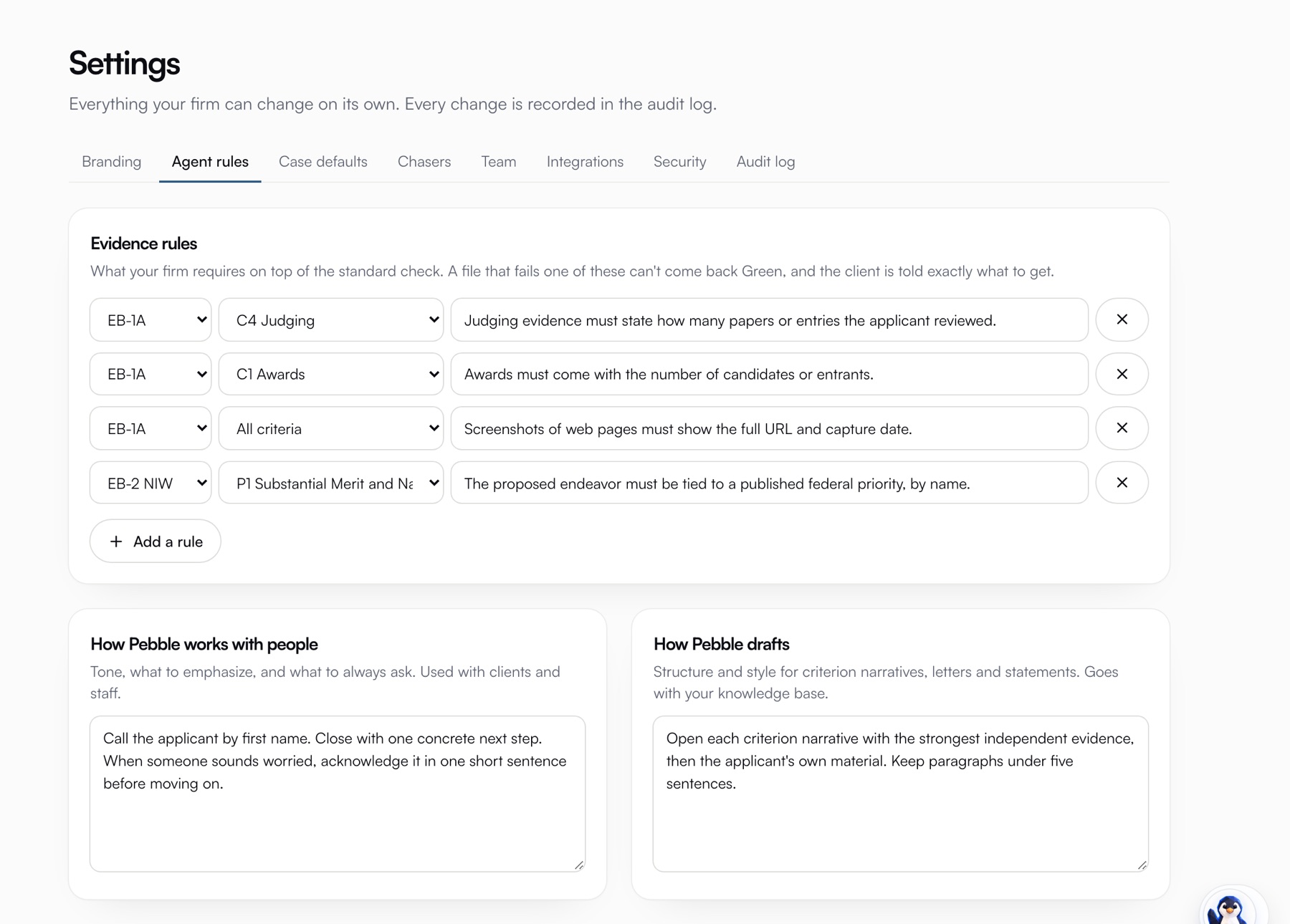
Settings, Agent rules · demo firm, sample data
Partner · Settings
The firm adds its own rules.
Pick the visa and criterion
Write the rule in plain words
Add as many as the firm needs
A file that breaks a firm rule can't come back Green. Firm rules add to Pebble's built-in limits and can't remove them. Settings also hold branding, case defaults, chaser timing, team, security and the audit log.
Pebble's jobs
Pebble proposes. A person says yes.
Evidence check
On every uploadClient sees it at once; staff can override
Chasers
Daily, mornings U.S. time, or "Check cases now"Staff approve every one
Narrative and letter drafts
When staff or the client askClient sees it only after release
Knowledge base answers
From the firm's templates and past briefs, source named. No client personal data goes in.Staff ask
Exhibit index and Bates PDF
On clickStaff choose what to file
Résumé or LinkedIn import
Client uploads a PDFNothing joins until a person accepts
Public-record research
Only after the client ticks consentEach finding linked; a person accepts
123
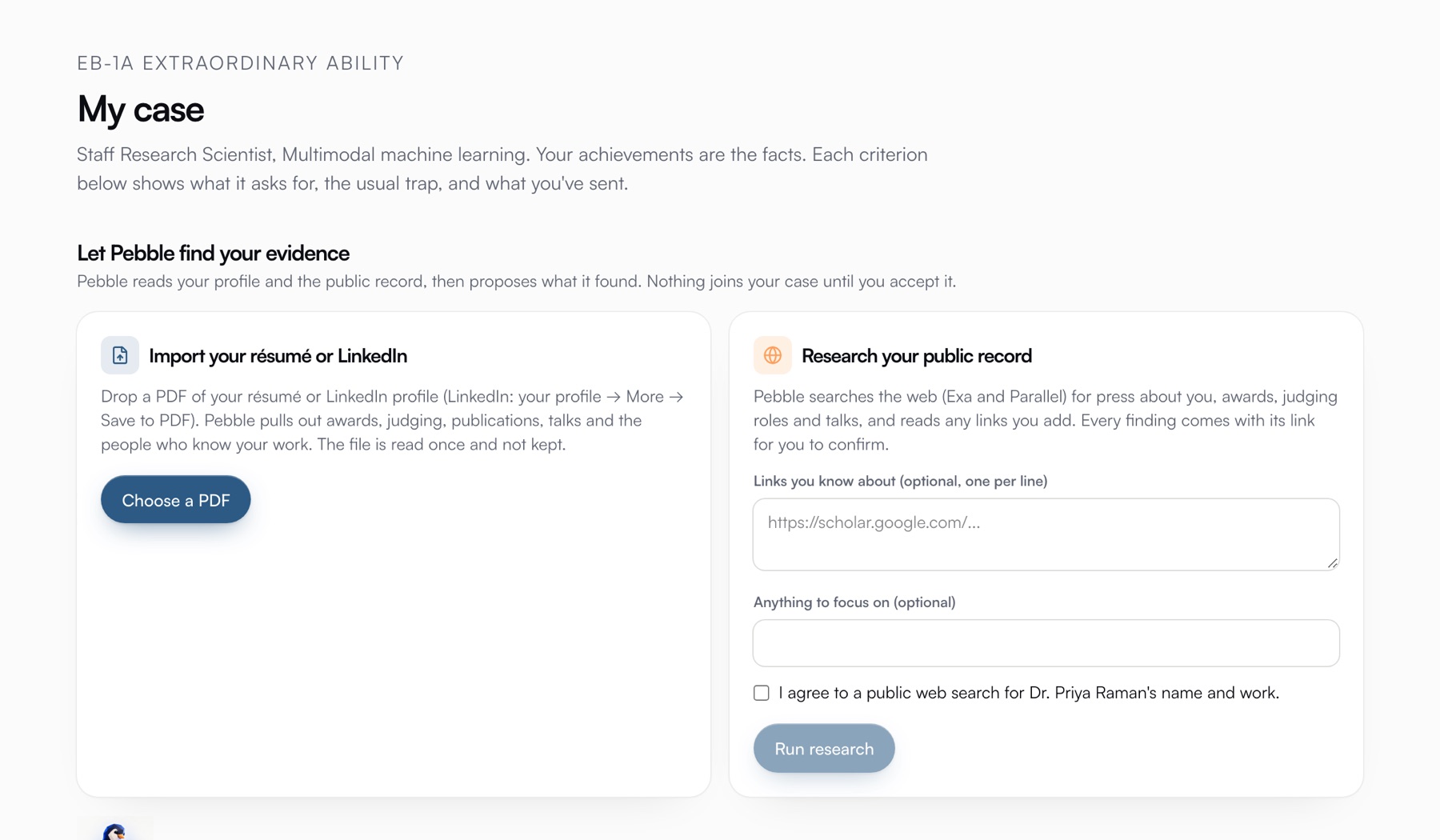
Research your public record · demo firm, sample data
Pebble · Import and research
Pebble finds evidence the client forgot.
Search the web for press, awards and judging roles
Add links the client already knows
Runs only after the client ticks consent
Résumé or LinkedIn import: Pebble pulls out awards, judging, papers, talks and names; the file is read once and not kept. A common name can turn up strangers, so staff check a finding before building an exhibit from it.
123
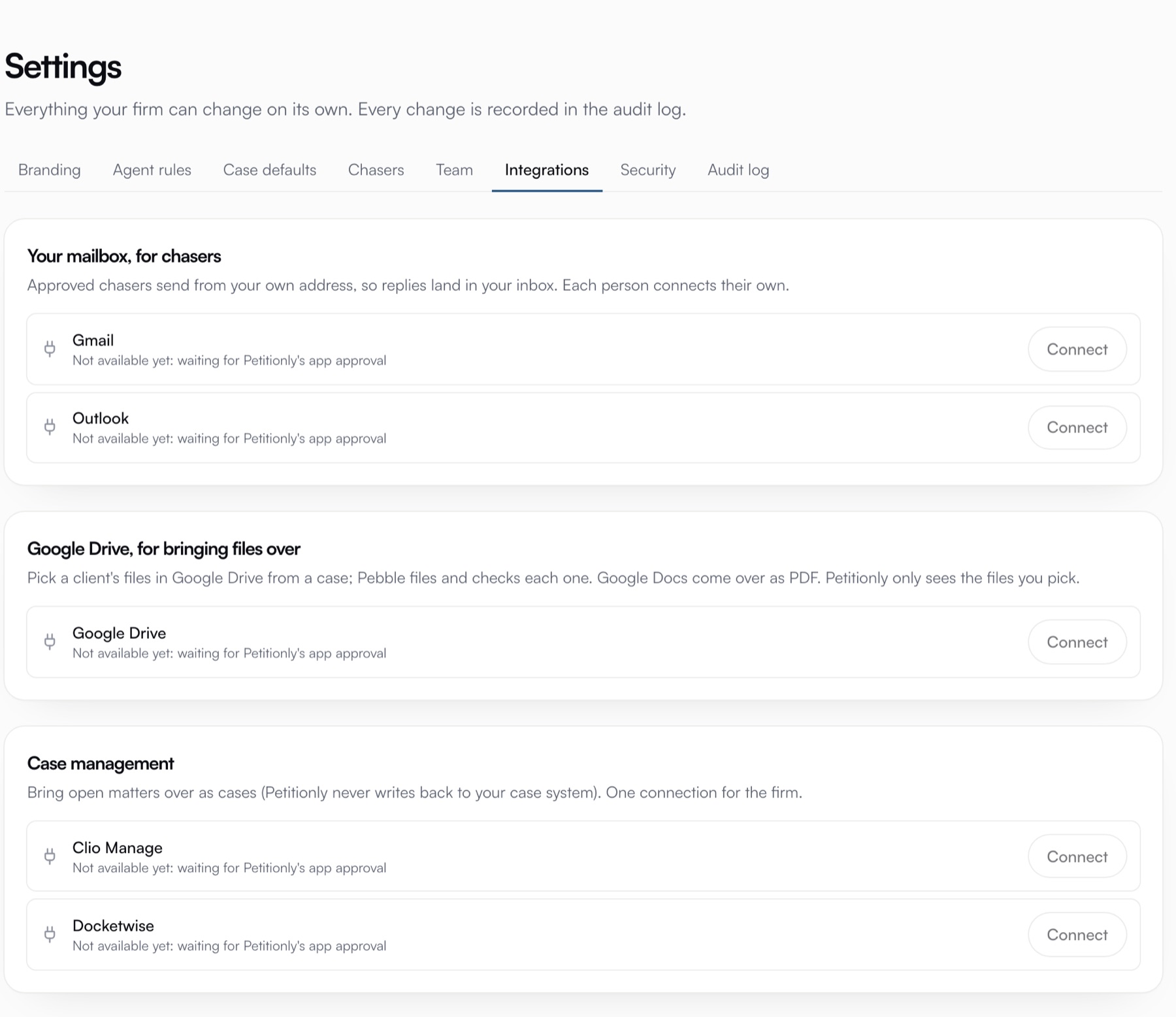
Settings, Integrations · demo firm, sample data
Integrations
Connects to the firm's mail, Drive and case system.
Chasers send from the staff member's own address
Waiting on Google's and Microsoft's app approval
Pick a client's Drive files; each gets checked
Clio and Docketwise: matters come over, read only. A spreadsheet (CSV) import works today. USCIS status checks run only with recorded client consent. All built; none yet run with a firm's live account.
05of 8
Safeguards and limits
What waits for a person, what doesn't, and where the edges are.
Who approves
Most things wait for a person. Two don't.
Waits for a person
Every chaser email
Every draft, before a client sees it
Every portal reminder
Every research finding and import proposal
Pebble's task suggestions to staff
Reaches the client straight away
The upload verdict: Green, Amber or Red
Pebble's chat replies
Staff can override any verdict afterwards.
On every client screen
“AI checks can be wrong; your attorney reviews everything before it is filed.”
No legal advice
No approval odds
Never "you qualify"
That sentence is true, and it matters: the check can miss things or flag the wrong thing.
Speed and accuracy
A check takes seconds. Accuracy is tested on the firm's files.
~5 sec
per file, on small synthetic test PDFs (a one-page invitation letter): measured runs took about 4 and about 8 seconds
Not measured yet
Long or scanned files
An average over many uploads
Accuracy on real client evidence
The first accuracy check is Day 6 of each build: the firm's paralegal compares verdicts on sample files.
Not in the product yet
What it doesn't do yet.
Calendar booking
Payments
E-signature
Text messages
Malware scanning on upload
O-1 advisory-opinion and itinerary check
NIW endeavor-drift check
Recommender workspace
The mail, Drive, Clio and Docketwise connections are built and waiting on app approvals; none has run with a firm's live account yet.
123
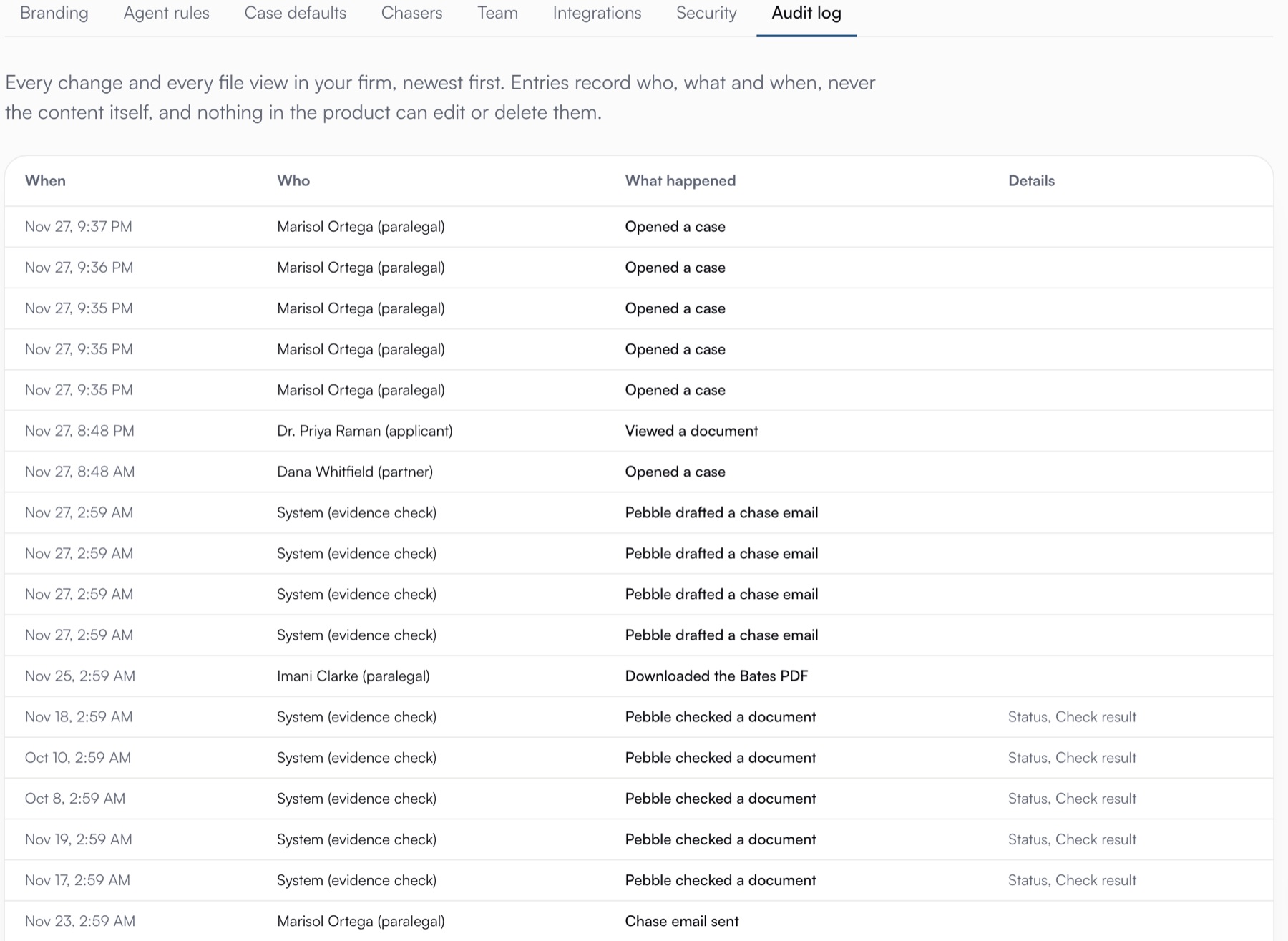
Settings, Audit log · demo firm, sample data
Security
Every firm is walled off. Every view is logged.
When
Who: a person, or Pebble
What happened, never the content
Each firm is a separate "tenant": another firm's data reads as "not found", and a test suite checks this across every function. Files are never on a shareable link. Nothing in the product edits the log.
Security
What's in place, and what isn't yet.
In place
Two-step sign-in for staff; a firm can require it
Idle sign-out the firm sets; disabled staff lose access at once
Mailbox tokens encrypted; Gmail can only send, Drive sees only picked files
Documents treated as data: instructions hidden in a file are ignored
A monthly AI spend cap per firm
Not yet
No outside security test yet
No SOC 2 or other certification
No malware scanning on uploads
Data and privacy
Four questions a firm will ask about its data.
Who touches our data?
A data processing agreement (DPA) names every subprocessor: Convex (database, with region), Vercel (hosting), Anthropic (AI), Resend (email), and Google or Microsoft if connected.
Does the AI company keep our files?
Anthropic's default is 30 days. Zero data retention has been requested, not confirmed.
How long do you keep things?
If a firm leaves, everything is deleted, after an export.
Can we get our data out?
Yes, by hand today: per-case Bates PDFs and exhibit indexes. There's no one-click "export everything" yet.
Ethics
Built to be the firm's supervised tool.
What the bar guidance asks
ABA Opinion 512 (Jul 2024): understand the tool, protect confidentiality, supervise staff and vendors, sometimes get informed consent
Florida Op. 24-1: an AI chatbot must say it's AI
California: no AI acting "without meaningful lawyer supervision and review"
How Petitionly fits
An AI notice on every client screen
The firm's attorney owns and approves the rules
The audit log shows who did what
Never tells a client whether they qualify: that's practising law (8 CFR 1.2)
We offer an AI-use paragraph for engagement letters; the firm's attorney decides the final text.
It's the firm's supervised tool. Staff approve every chaser, drafts wait for release, and there's an audit log. Upload verdicts reach the client at once; staff can override them.
Where do our clients' files go?
Kept apart from every other firm, never on a public link, every view logged. A DPA is signed before real client files go in. No certifications are claimed.
We already use Clio or Docketwise.
Keep it. Petitionly sits next to it. A spreadsheet import works today; the direct connections are built and waiting on app approval.
Will it replace our paralegal?
No. It takes the first read of every upload and the first draft of every follow-up. She approves every chaser and keeps the judgment calls.
Our clients won't use a portal.
Chasers still go out by email from the firm's own address. Merit clients often track their own evidence already.
Who keeps it running?
Monthly support makes us responsible. The firm's cases, rules and templates are its own, with an export on request.




 123
 123
 123
 123
 123
 12
 123
 123
 123
 123
 123
 123
 123
 123

 123