The agentic case team behind your immigration practice.
Catch the weak exhibit before it reaches your attorney's desk. We build your firm its own portal, where Pebble checks every upload, chases what's missing and drafts in your style.
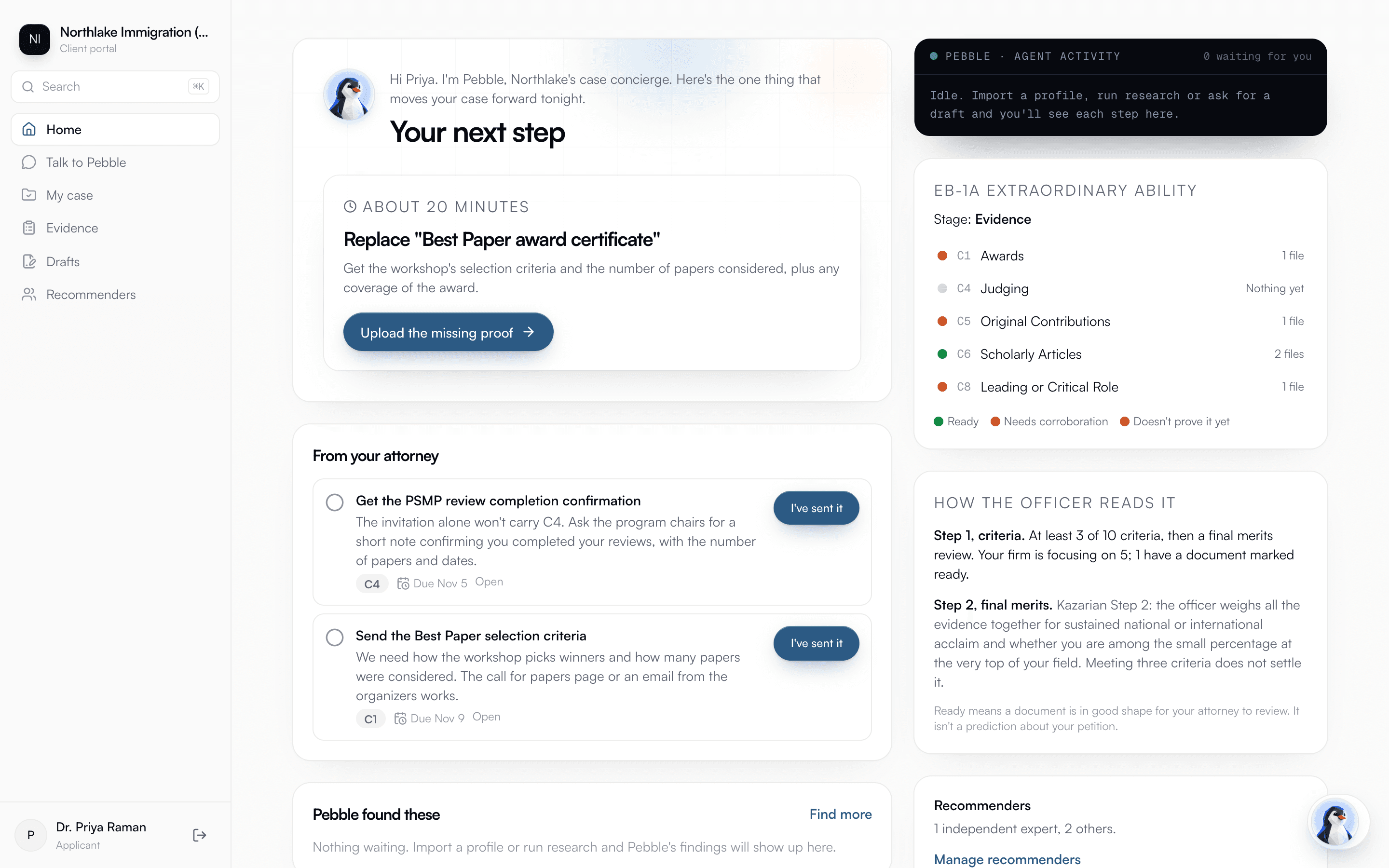
Clients see the one task that would help their case most, what you assigned with due dates, and a log of what Pebble did on their case.
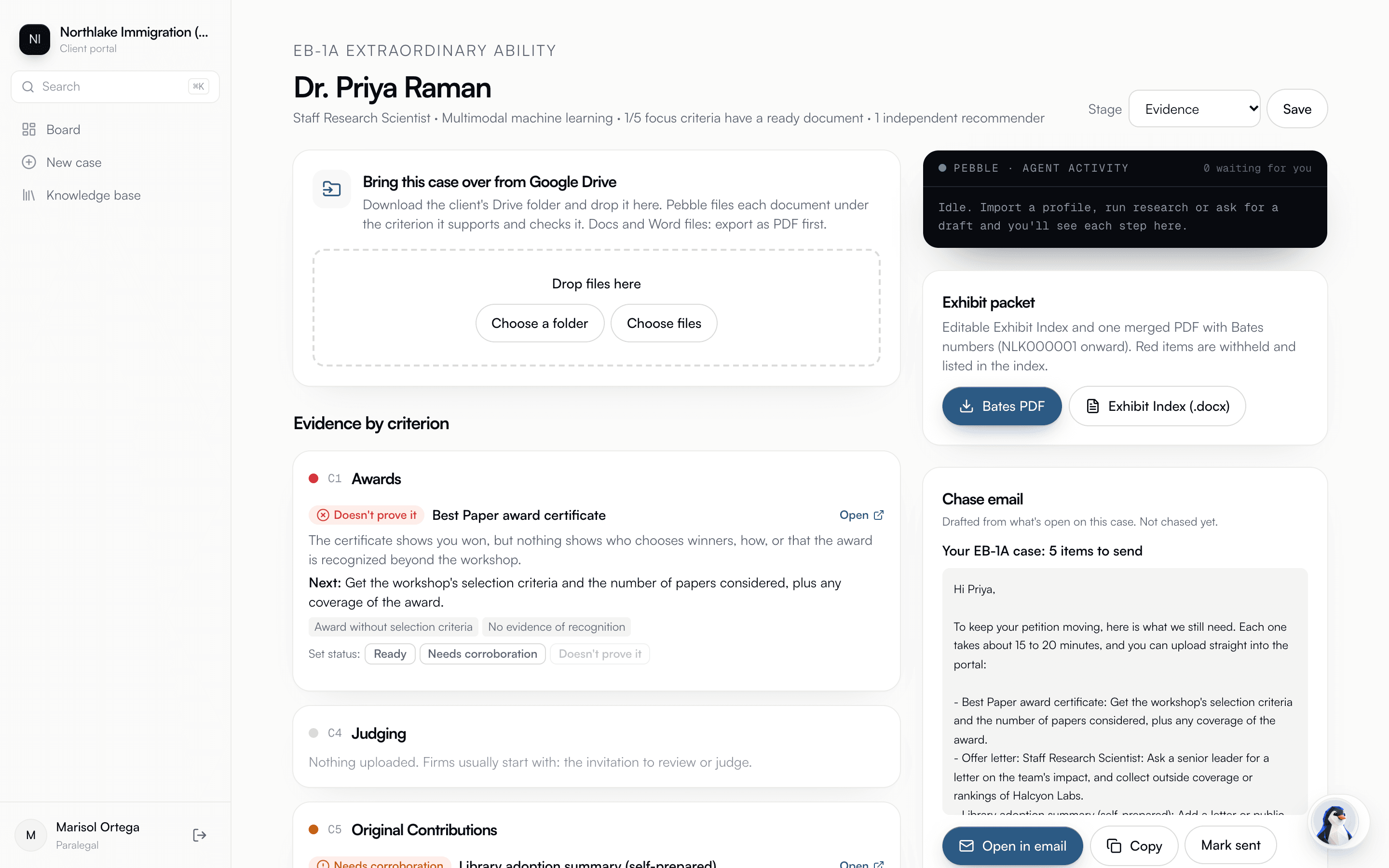
Real product screens. Sample case: every name and document is synthetic.
Works withGmailOutlookGoogle DriveGoogle CalendarClioDocketwise
One place for the whole case
Pebble sits between your inbox, your files and your clients.
Cases come over from Clio or Docketwise. Client folders come in from Google Drive and each file is sorted under the criterion it supports. Approved chasers go out from your paralegal's own Gmail or Outlook, so replies land where your team already works.
Move in, not start over
Clio, Docketwise, CSV and Drive import
Your own inbox
Chasers send from Gmail or Outlook
Your address
portal.yourfirm.com, one CNAME record
Ready to file
Word exhibit index and Bates PDF
What we build for you
A client portal under your firm's name, with Pebble, its AI assistant, doing the sorting, checking and chasing your paralegals do by hand today. Every build starts from the same tested base, then we set it up around your criteria, wording and exhibit style.
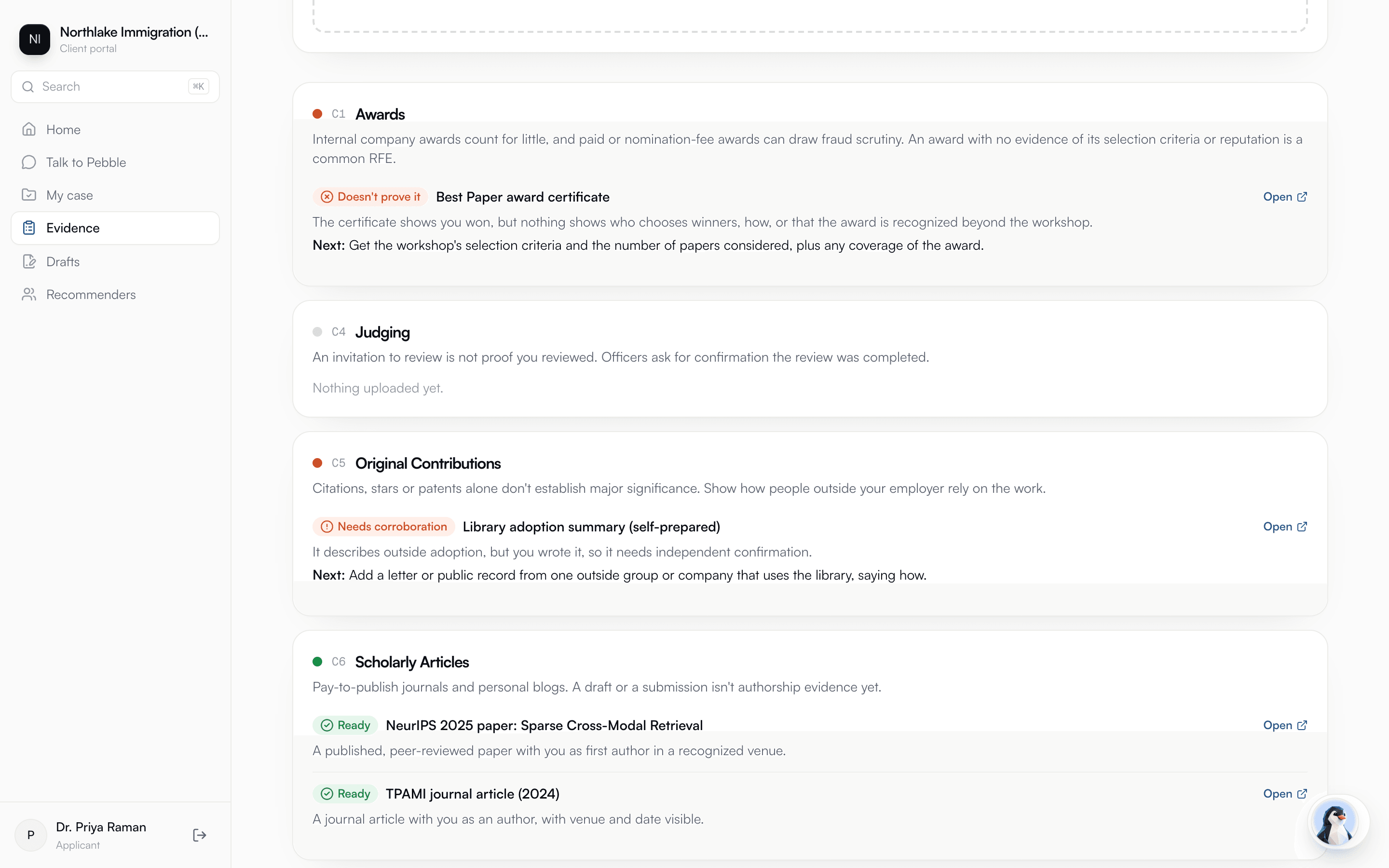
Every upload checked against its criterion
Each document is read against the criterion it's meant to prove before anyone at your firm opens it. A judging invitation with no proof the review happened, an award with no selection criteria, press about the employer rather than the client: the client hears what's wrong within seconds, and what to get instead.
Evidence checkSample case
Drop a file. Pebble reads it against the criterion it should prove.
review-invitation.pdf
Filed under C4 Judging
About 5 seconds per file in the live product. Your staff can override any verdict.
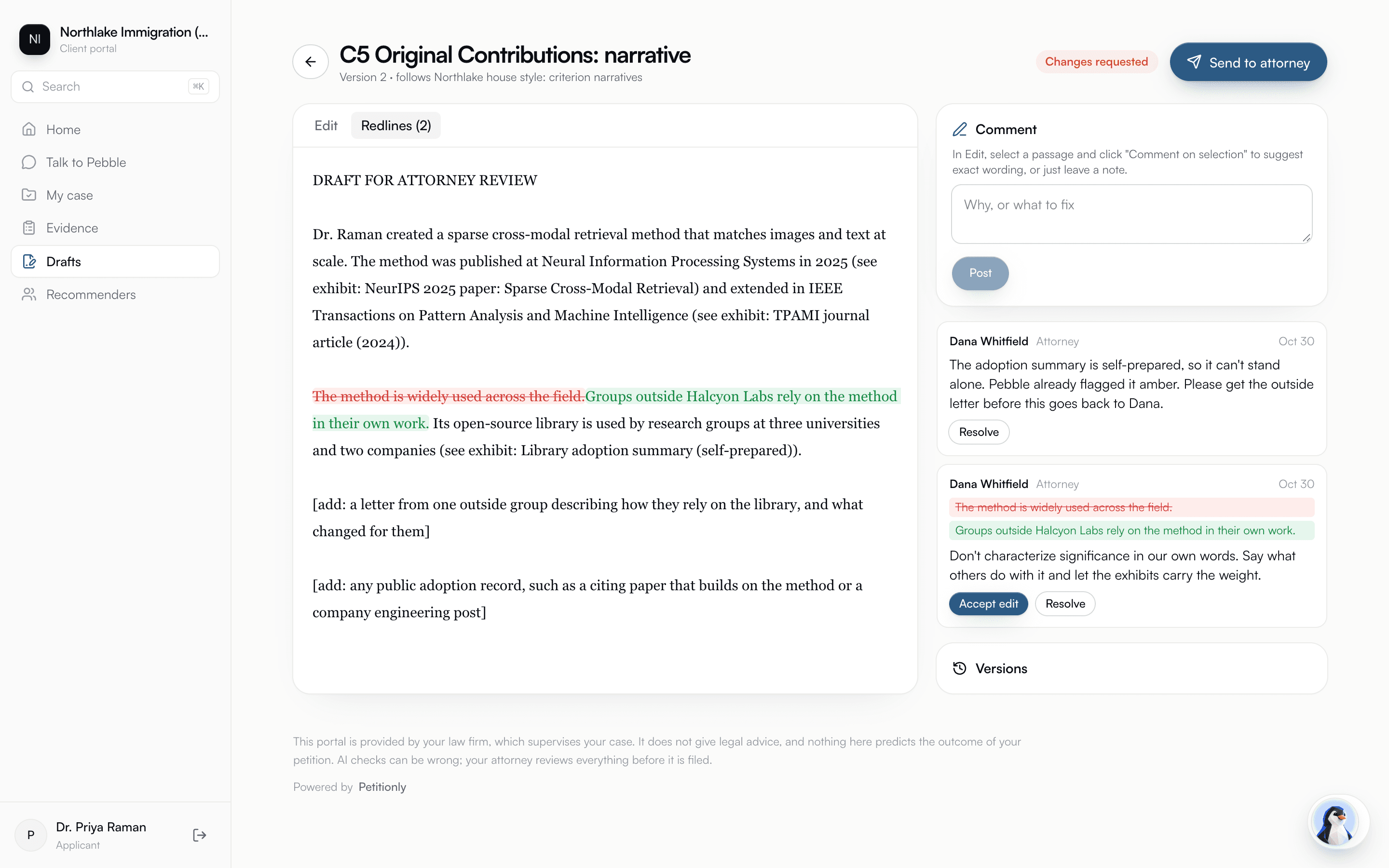
Drafts in your house style
Criterion narratives and recommendation letter drafts, written only from facts and exhibits on file and following your templates. Gaps are marked [add: …] rather than guessed. Your attorneys redline; the client accepts each edit in one click.
C5 narrative · v2Changes requested
Dr. Raman created a sparse cross-modal retrieval method that matches images and text at scale. The method is widely used across the field. Groups outside Halcyon Labs rely on the method in their own work. [add: a letter from one outside group]
DW
Dana Whitfield· Attorney
Say what others do with it. Let the exhibits carry the weight.
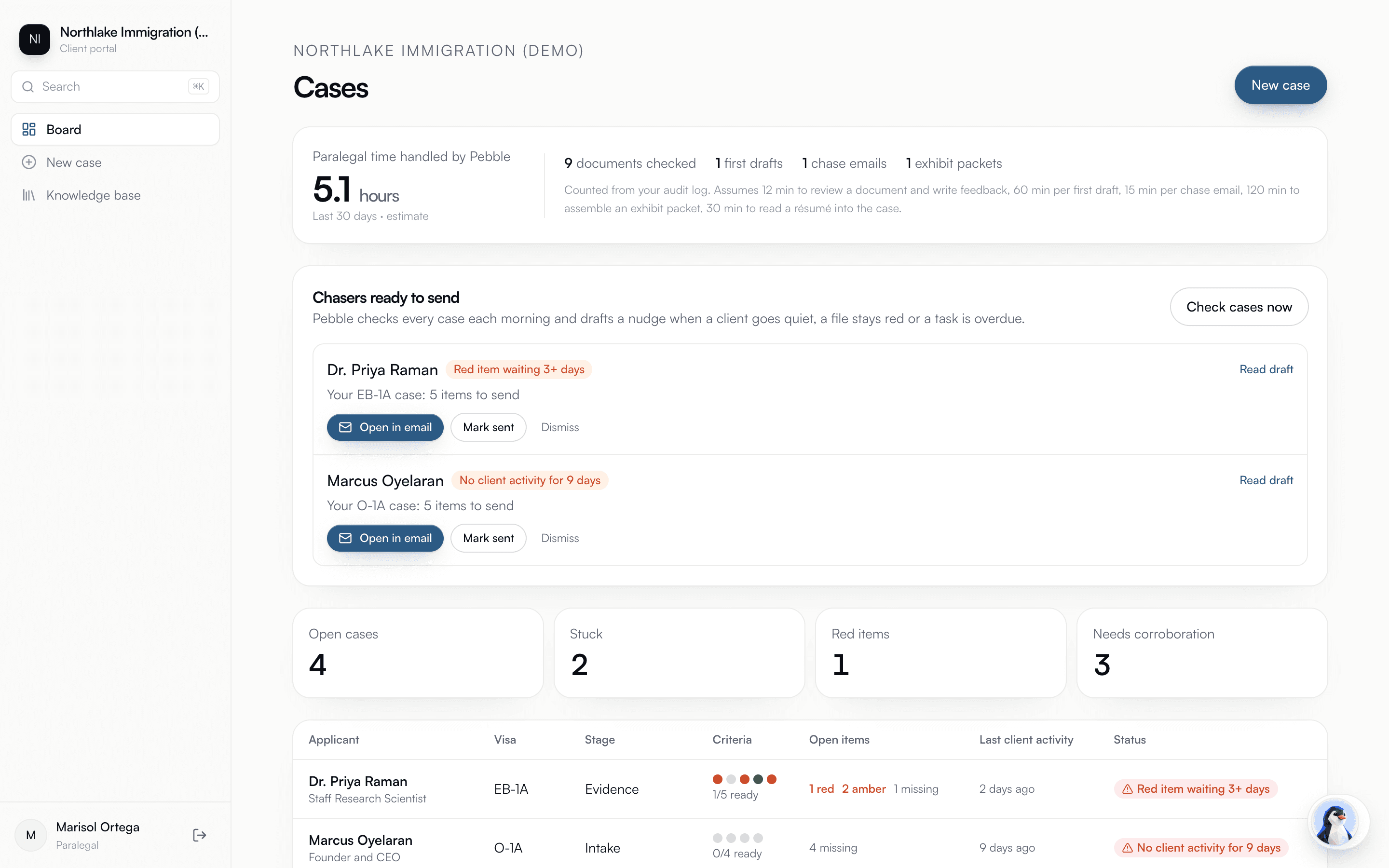
Chasers your paralegal approves
Each morning Pebble looks over every open case. When a client goes quiet, a file stays red or a task slips, the chase email is already written from what's missing. Your paralegal reads it, edits it if they want, and approves it. It sends from their own Gmail or Outlook.
Chasers ready · 7:00 amSample case
Marcus OyelaranO-1A
Your O-1A case: 4 items to send
No client activity for 9 days
Dr. Priya RamanEB-1A
Your EB-1A case: 3 items to send
Red item waiting 3+ days
Dr. Elena SokolovaNIW
Your EB-2 NIW case: 1 item to send
Task due yesterday
Each draft lists exactly what's missing. Nothing goes out until your paralegal sends it.
Exhibit index and Bates packet
An editable Word exhibit index and one merged PDF with tab sheets and Bates numbers that match it. Anything still flagged is held back and listed, so you decide what goes in.
C6-2
NLK000015
C6-1
NLK000006
C5-1
NLK000003
C4-1
NLK000001
C4-1
Reviewer service confirmation
NLK000001-02
C5-1
Outside adoption letter
NLK000003-05
C6-1
NeurIPS 2025 paper
NLK000006-14
C6-2
TPAMI journal article
NLK000015-27
How the engagement runs
You don't learn new software alone. We set it up around how your firm already works, then stay on to support it. Most of the work is ours; the list below says what we need from you.
1Before kickoff
Discovery
A call with your partners and a paralegal. We learn which visa types you run, how you argue each criterion and where cases stall today. You get a written scope.
2Week 1
Build around your playbook
Your evidence rules, drafting templates, chaser wording, exhibit naming and Bates prefix, under your name, colors and address.
3Week 2
Move your cases over
We bring your active matters and their files across with your team and check them in, so day one isn't an empty portal.
4End of week 2
Train your team, go live
Live sessions for partners and paralegals, a short guide your clients can follow on their own, then your portal goes live.
5Every month after
Support
We keep it running, fix what breaks and adjust the checks and wording as your practice changes.
Live in about 2 weeks from kickoff. We set your dates after the discovery call.
What's included
Your portal under your firm's name, colors and address
Evidence rules for the visa types you run: O-1A, EB-1A, NIW
Pebble for your clients, and for your staff on each case
Upload checks, drafting, chasers and exhibit export
Case and file import from your current tools
Training for your team
Hosting and monthly support
What we need from your firm
A partner and a paralegal for the discovery call and two short reviews
Your templates, house style and a few redacted past petitions
An export from Clio, Docketwise or your spreadsheet, and the Drive folders for active cases
Your logo and brand colors
One DNS record for your portal address
How your clients' files are handled
Your clients will ask how their documents are handled. These controls come with every build.
Tenant isolation, tested
Every change runs a test that signs in as two firms and three roles and proves none can read, write, upload or export across the line.
No shareable file links
Files never get a public URL. Opening one is an access check plus an audit entry, and the bytes stream through our server.
Append-only audit log
Who viewed, changed, approved or exported what, and when. Never the content. Nothing in the product can edit or delete it.
Agents only propose
Imports, research and drafts land as proposals. A person accepts each one. Staff approve every chaser, and clients see an AI draft only after staff release it.
No invented facts
Pebble writes only from what's on file and marks gaps as [add: …]. Research keeps only links the search actually returned.
Résumés read once
Profile PDFs are read for the import and deleted from storage right after. Public research needs the client's consent.
Questions partners ask first
Who maintains it after launch?
We do. Every build comes with monthly support: we keep it running, fix problems and adjust the checks, templates and wording as your practice changes. You won't need anyone technical on staff.
Where is it hosted?
On our accounts by default, with your firm's data walled off from every other firm and a test that proves it on every change. If your firm needs it on its own cloud accounts, we can set it up there. We'll scope that on the call.
Who owns our data?
Your firm does. Your cases, files, rules and templates are yours. Ask for a full export at any time, including if you decide to leave, and we'll hand it over.
Does it work with Clio or Docketwise?
Alongside them. We bring matters over from Clio, Docketwise or a CSV, and your case management system stays where it is.
Do our attorneys stay in control?
Yes. Pebble proposes and a person accepts. Staff approve every chaser before it sends, and clients see an AI draft only after your staff release it. Upload checks reach the client right away, so they can fix a weak document while it's still in hand, and your staff can override any verdict.
How does it use AI, and is that ethical for a law firm?
Pebble runs on Anthropic's Claude models. It writes only from facts on file and marks gaps as [add: …] instead of guessing. It doesn't give legal advice, tell clients they qualify or estimate approval odds, and every client screen says it's an AI assistant. Your attorneys supervise its work as they would a paralegal's. We'll walk your ethics reviewer through how data is handled.
Does it replace our paralegals?
No. It takes the sorting, checking and chasing off their desks so the same team can carry more cases, and they make the calls on what goes out.
How long until we're live?
About 2 weeks from kickoff: the first week to build around your playbook, the second to move your cases over and train your team. We agree the dates after the discovery call, and the pace of your team's reviews counts too.
What does it cost?
It depends on your firm's size and the visa types you run. Each firm gets a fixed build fee and monthly support, quoted after the discovery call.
Which petitions does it cover?
O-1A, EB-1A and EB-2 NIW, with each criterion's rule, the common trap and what to collect built in.
Read the guide →How is it different from Docketwise, Clio or INSZoom?
Those run the practice: forms, e-filing, billing and case status. Petitionly is the client side of a merit case: it checks each upload against the criterion, chases what's missing and builds the exhibit packet. It works beside your case management system, not instead of it.
Policy alert PA-2026-05 (August 5, 2026) lets officers deny for missing required initial evidence without first sending an RFE or NOID. A complete file at filing matters more than before. Pebble checks each upload as it arrives, so gaps surface while there's still time to fix them.
Read the guide →Can we move over from spreadsheets and Drive folders?
Yes. We import client folders from Google Drive and sort each file under the criterion it supports, and bring cases in from a CSV, Clio or Docketwise. Your team doesn't re-key anything.
Yes. Clients list their recommenders in the portal, Pebble drafts each letter from the facts on file, and your staff edit and release it. Gaps are marked for your team instead of filled with guesses.
Thirty minutes with Aayan Rehman, our founder: Pebble working a sample case, then what we'd set up for you. The standard build has you live about 2 weeks after kickoff.

 Gmail
 Outlook
 Google Drive
 Google Calendar
 Clio
 Docketwise